AI Filmmaking Free: A Practical Guide to Getting Started
You can start AI filmmaking free by using no-cost tools for essential production stages like writing, editing, and sound design. This approach allows you to create a complete proof of concept for your ai film without any financial investment. By leveraging powerful and accessible software, aspiring filmmakers can develop their vision, produce initial works, and attract potential funding for larger projects. The key, according to AI filmmaker Austin Zartman, is to focus on the creative elements you can control without a budget before seeking resources for more complex production steps of the ai filmmaking process.
What Parts of an AI Film Can You Make for Free?
You can handle the foundational elements of AI filmmaking—writing, video editing, and sourcing sound assets—entirely for free. The most critical component of any film is the story, which costs nothing but time and creative effort. Once you have a solid script, you can manage the entire post-production process using powerful, no-cost software for editing, color grading, and sound design. This strategy allows you to assemble a complete project without initial spending.
AI filmmaker Austin Zartman, creator of the AI short-film series ASHES, emphasizes starting with what is freely available. "Focus on the writing, right? That's something you can do for free," he advises. The script serves as the essential blueprint for your AI-generated visuals. After you have generated your video clips, you can move into post-production, where a wealth of free resources is available. This script-first approach is the foundation of effective AI filmmaking free of charge, as it minimizes financial risk and places the focus on developing a strong narrative concept first.
What is the Best Free Video Editing Software for AI Films?
DaVinci Resolve and Capcut are two of the best free video editing software options for AI filmmaking. The choice between them often depends on your computer's hardware and the complexity of your project. Both provide the necessary tools to assemble, refine, and finish your ai film.
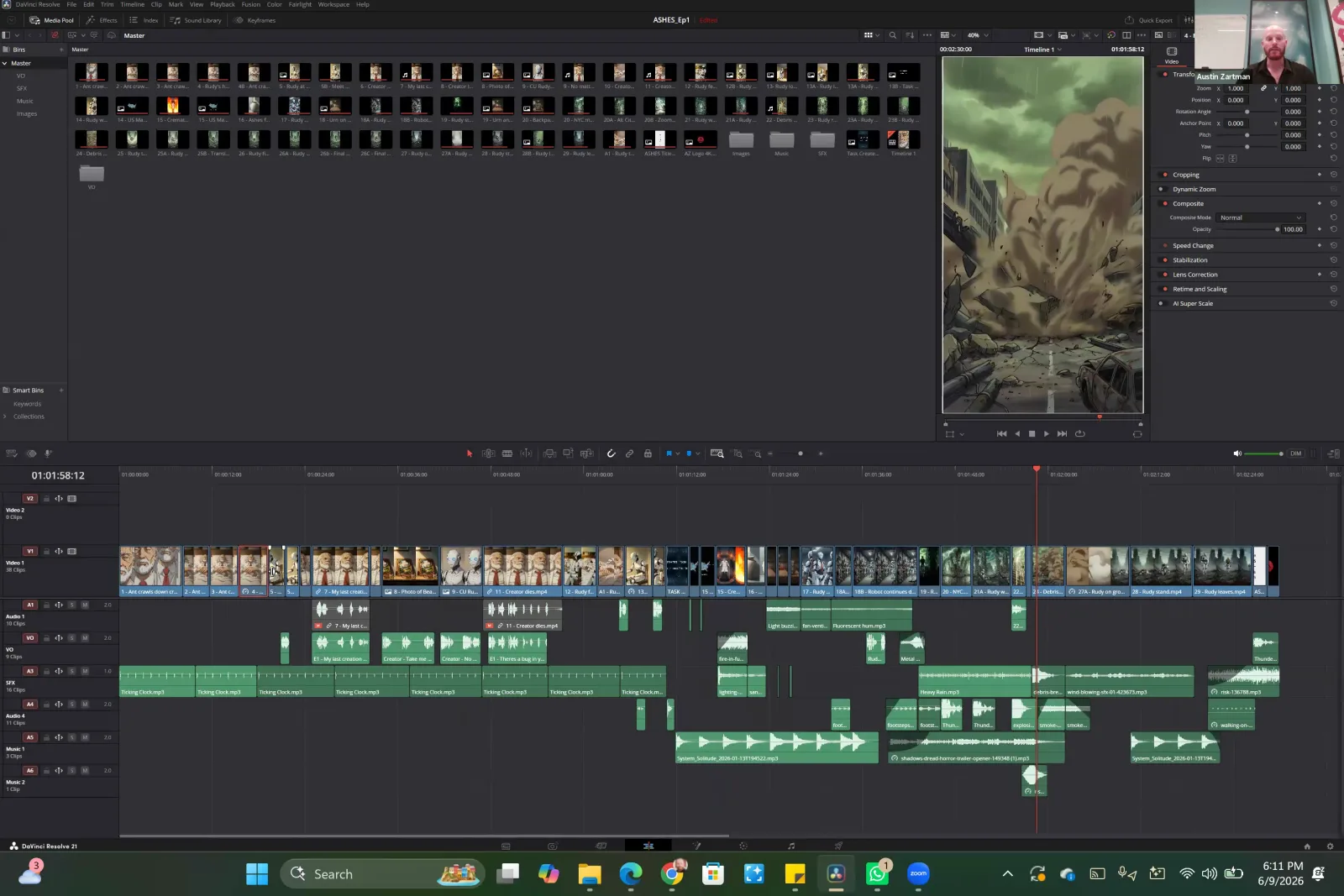
Austin Zartman personally uses the free version of DaVinci Resolve for his projects, a testament to its professional-grade capabilities. He states, "I use Da Vinci... the free version is it's so there's so many like little tools you can use with it, but I've never even considered using the paid version." This highlights that the software is more than sufficient for serious work. Its strengths include:
- Advanced Color Correction: Fine-tune the look of disparate AI-generated clips to create a cohesive visual style.
- Professional Editing Tools: A full suite of timeline-based editing features for precise cuts and sequencing.
- Integrated Audio Post-Production: Fairlight audio tools allow for detailed sound editing and mixing within the same application.
For creators who may not have high-end hardware, Zartman points to other accessible options. "Capcut is a hugely popular one that's also like less intensive on your computer," he notes. Beyond these two, he also mentions the existence of browser-based editing tools, which remove the need for a powerful laptop altogether. This range of free software ensures that nearly anyone can start editing their AI-generated footage, making the post-production phase of ai filmmaking accessible to all.
Where Can You Find Free Music and Sound for Your AI Film?
You can find high-quality, free music and sound effects for your ai film on platforms like Pixabay. Sound design is critical in AI filmmaking because it helps ground the often surreal or inconsistent visuals in a believable reality. A well-designed soundscape can make an audience accept what they are seeing, and you can build one without spending any money.
Austin Zartman recommends Pixabay, explaining that he uses it for his own work. "There's a website called Pixabay that has uh free music, free uh sound effects that you can download," he shared during his masterclass. He uses these assets for everything from atmospheric background music to specific, impactful sound cues that are synchronized with the action on screen.
Zartman illustrated this by showing his editing timeline, which was filled with audio clips that constitute the soundscape of his films. "All of these like green clips that you see on this under this timeline, those are all sound effects. They're pieces of uh dialogue, they're um, uh pieces of music. And these are all things that I got from free platforms." Building a rich audio environment is a key part of the filmmaking process, and leveraging free resources like Pixabay makes it possible to achieve professional results.
How to Start Your AI Filmmaking Free Project
You can start an AI filmmaking free project by focusing on the free components first to create a compelling proof of concept. This strategy, advocated by Austin Zartman, involves producing a small, complete piece of work to showcase your idea and demonstrate its potential. This approach proves the project's value without requiring an upfront financial investment.
Zartman's strategy is to build momentum with a finished product, no matter how small. He advises creators to "make a proof of concept, three episodes, right?" This gives platforms, investors, or an audience a concrete example of the story, characters, and visual style. The goal is to make something compelling enough that it generates interest and support.
If this initial, freely produced work is a hit, it can unlock the resources needed for a larger production. "If that, you know, platform likes it or or you put on, you know, people love it, they'll you get the money," Zartman explains. "You get the money to to then hire professionals for these each different steps and then you can make a whole show." This method turns a small, no-budget project into a calling card for a fully-funded series.
Frequently asked questions
Is DaVinci Resolve really free?
Yes, the base version, simply called DaVinci Resolve, is completely free and includes professional-grade tools for editing, color correction, and audio post-production. AI filmmaker Austin Zartman confirms he uses this free version for his work and finds it so robust that he has never needed the paid Studio version.
Do I need a powerful computer for AI film editing?
Not necessarily. While professional software like DaVinci Resolve can be resource-intensive, Austin Zartman suggests alternatives like Capcut, which he notes is "less intensive on your computer." There are also browser-based editors that run online, further reducing the need for powerful local hardware.
What's a good source for free sound effects?
Pixabay is an excellent source for free sound effects and music for your AI film. It is a platform specifically recommended by AI filmmaker Austin Zartman, who uses it to source the majority of the audio elements for his own projects, from music tracks to individual sound clips.
Can I make a full AI film series for free?
You can create the initial episodes or a proof of concept for free by using no-cost tools for writing, editing, and sound. Austin Zartman recommends this approach to build an audience and demonstrate your project's value, which can then help you attract funding to produce a full series with a professional team.
Keep learning
This guide is part of the Introduction to AI Filmmaking masterclass lesson.
Related guides:
Comments
Sign in with your Leyline account to join the conversation.